

Starting with Amfortis 3.0

At a Glance
Amfortis 3.0 is the third version of ECO3's advanced automated workflow for the packaging markets.
This page will help you starting with Amfortis 3.0.
If Amfortis is not installed and configured yet, contact your local service organisation.
If you have a newer or older version, go to the Starting with Amfortis overview page.
Applies To:
Amfortis Render - Amfortis Workflow - Amfortis PlateAssembler
Apogee Prepress with Packaging Pack
Before You Begin
1. Download Amfortis Sample Files
Before starting the excercises, download the Amfortis packaging sample files.
2. Load Amfortis Resources
Preferably this step is to be done by a Service Technician.
• Download the latest Amfortis resources and extract the zip file on the Apogee server
• Start menu > All programs > ECO3 > Config Manager (or double click the 'Config Manager' shortcut on desktop). The Configuration Manager can only run on the Apogee server and the Server must be running
• Keep all default 'Import/Export' settings but make sure to enable 'Overwrite existing resources and parameter sets on import' (1)
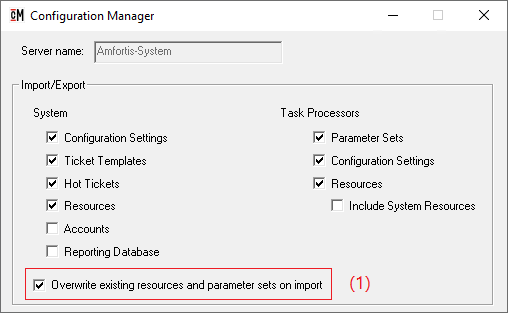
• Click Browse, select the '...\Prepress 14.x Amfortis Resources\Configuration Manager' folder
• Click 'Import'
3. Setup client preferences
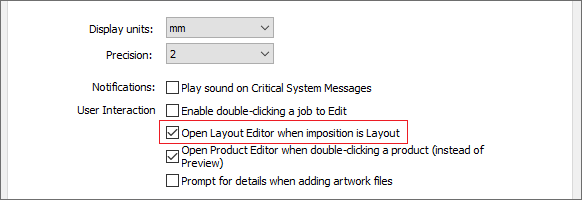
• Open the client and select Edit > Preferences > General
• Enable 'Open Layout Editor when imposition is Layout'. This option will automatically open layout editor when creating a new packaging job
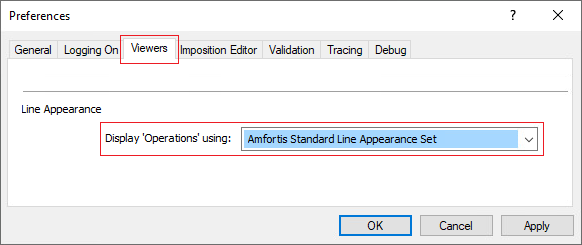
• In the 'Viewers' tab, set the Line Appearance to Amfortis Standard Line Appearance Set
• Click 'OK' to save the preferences
Overview Packaging Tutorials
| Packaging Tutorials for Amfortis Render - Amfortis Workflow - Amfortis PlateAssembler |
|---|
|

