PDF Render - Render Settings
 |
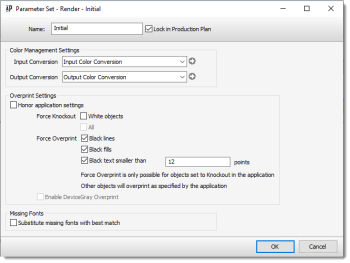
This dialog box allows you to view or edit the Render settings of the PDF Render Task Processor. These settings define how color management is applied to the incoming data.
 |
Document-Based Color Management settings
This mode uses the input and output conversion presets for Color Management.
NOTE: This mode is the only supported mode.
Input Conversion
The drop-down list displays all the available input conversion presets. You can click the gray arrow to open the editor to consult or edit the settings. See “Input Color Conversions Overview” for more information.
Output Conversion
The drop-down list displays all the available output conversion presets. You can click the gray arrow to open the editor to consult or edit the settings. See “Output Color Conversions Overview” for more information.
Overprint Settings
Honor application settings
If the Honor Application Settings check box is selected, all overprint settings will be taken from the information in the incoming document. In this case, the Force Knockout and Overprint settings are not displayed. If this check box is cleared, the Task Processor settings are displayed and enabled, and will overrule all overprint settings in the incoming document.
Force Knockout
This section is only displayed when the Overprint Honor application settings check box is deselected. This option detects all “White objects” set to overprint, and changes them to knockout.
Force Overprint
This section is only displayed when the Overprint Honor application settings check box is deselected. Here, you can choose your black overprint options by selecting the available check boxes.
You can overprint any combination of black objects (lines, fills, and text). In the case of overprinting text, a point size limit can be set, above which no overprinting of the characters is forced. Setting this value high will cause all black text to be overprinted.
Missing Fonts
Select the ‘Substitute missing fonts with’ check box if you want Apogee to replace them with one of the available fonts in the associated drop-down list.
doc. version 14.0.1