Basic Workflow
A typical Apogee workflow is as follows:
1 Create Ticket (including input channel)
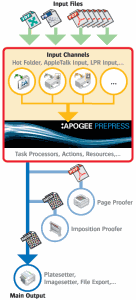
You start any workflow by creating or editing a Ticket. The Ticket defines an input channel, and describes exactly how all documents received will be processed and output by Apogee.
NOTE: You can set up one or more input channels for the same ticket (Hot Folders, AppleTalk channels, JDF channels, etc.), and output consistently to a wide range of imagesetters, platesetters, and proofers.
 |
2 Input document(s)
You input your documents to the predefined input channel. Typically, these documents are PostScript, PDF, EPS, MIME, TIFF, GRS, JDF, CF2, or DXF format files. You either copy these files to a Hot Folder input channel, or print them to a predefined printer queue (AppleTalk, Named Pipe, etc.). If you are working in the Layout Editor, you will probably want to input images: PNG, JPG, BMP, PSD and AI.
Apogee automatically processes any input document or images according to the parameters specified in the Ticket. The result of this processing is a job.
3 Check job results
You can check your job results either onscreen, or by outputting them to a Proofer.
4 Approve job for output
If the job results are satisfactory, you can approve them for output to an output device.
doc. version 14.0.1