Apogee Scripting
The Apogee Scripting Engine (ApogeeScript) is a scripting framework that lets you add scripted processing at any point where Apogee supports scripting, for example the Export, TIFF Platesetter, Open Connect, Archiving, and InkDrive Task Processors.
For basic use, you do not need any scripting knowledge. You simply configure an INI file to run predefined functions. Custom Python functions can also be added to extend the available functionality.
NOTE: ApogeeScript feature requires a special license.
For installation details, see the Release Notes and the ApogeeScript - User Manual. Its home folder, which holds the application and its configuration files, is by default: C:\Scripts\ApogeeScript.
Using ApogeeScript in a Task Processor
1 In the Script field of a Task Processor that supports scripting, select ApogeeScript.exe. It is available from the home folder, or from the shared location \\127.0.0.1\SupportFiles\ApogeeScript\ApogeeScript.exe.
ApogeeScript automatically detects the mode it is used in (for example export or open connect) and, if no options are given, runs the default configuration file for that mode.
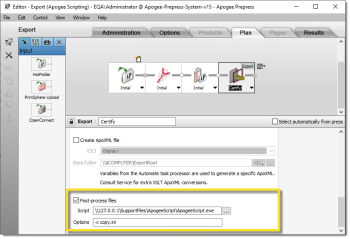 |
2 In the Options field (where the Task Processor provides one), you can:
•specify a custom configuration file with -c <name>.ini
•pass Apogee variables to the script with -s VAR1=$VALUE1 VAR2=$VALUE2
3 Place your configuration (.ini) files in the config folder: C:\Scripts\ApogeeScript\config
Finding functions and variables
ApogeeScript provides an extensive set of built-in functions and variables. To browse them with searchable help and examples, use either:
•the interactive mode: run "apogeescript -i" in a console in the home folder
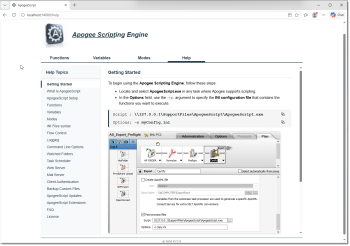
•the Apogee Scripting Engine web page on the Apogee server:
http://localhost:14080
http://localhost:14080
Logging
Log files are written to C:\Scripts\ApogeeScript\log; the active log file (without a date stamp) is ApogeeScript.log.
NOTE: From Prepress 15.0, the Apogee Script Collection software package, previously distributed as separate .vbs and .bat files, is no longer provided. The ApogeeScript feature replaces this package.
For the full description of the INI configuration syntax, the complete list of functions and variables, supported modes, additional tools (watched folders, task scheduler, web/mail server), custom Python functions, and licensing, see the ApogeeScript - User Manual.
doc. version 15.0.1