

Starting with Apogee Prepress 15.0

At a Glance
Apogee Prepress 15.0.0 is the latest version of ECO3's advanced automated workflow for the commercial, packaging, digital printing & wide-format sign and display markets.
This page will help you starting with Apogee Prepress 15.0.
If you have a newer or older version, go to the Starting with Apogee overview page.
Applies To:
Perpetual products: Render, Manage, Integrate and PlateMaker
Subscription products: Essential, Workflow Base, Workflow Pro and PlateMaker
Tutorial Sample Files and resources
Download the Apogee sample files via the Apogee Prepress 15.0 Client: "Help > Apogee Prepress Online > Download Sample Files" or download them here.
Download the latest Apogee resources and extract the resources on your Apogee Prepress Server.
Before You Begin
Set Apogee Client Preferences
In the Apogee Client, select Edit>Preferences.
Go to the Viewers tab, and in the Raster Preview, change the Auto-switch zoom factor to 1/32.
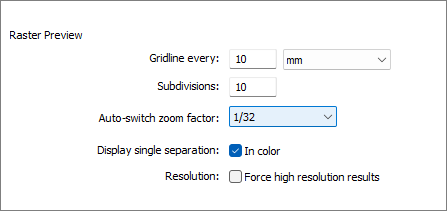
Click "OK" to save the setting.
Overview Apogee Prepress Tutorials
Below is a list of Apogee 15.0 tutorials, organized by subject.
The most recent published documents are visualized with a ⭐

